
Example 4 – Across two levels
What it is about
On OG1 of the sample project the toilet and the lavatory of the bathroom drain into a stack. Below, on EG, there is a horizontal branch of its own with a lavatory. The two levels are two drawings. You connect the end on OG1 with the horizontal branch on EG – and "Generate 3D" carries the load from OG1 on into EG.
The steps
- Draw the horizontal branch on OG1 and "Generate 3D" – total DU 2.5 at the stack.
- Draw the horizontal branch on EG – it starts at the stack from OG1, total DU 3.
- Connect on EG up to the end on OG1.
- "Generate 3D" on EG – the total DU stays 3.
- Query the values.
1. Draw the horizontal branch on OG1
The horizontal branch in the bathroom collects toilet and lavatory and leads them into the stack in the shaft.
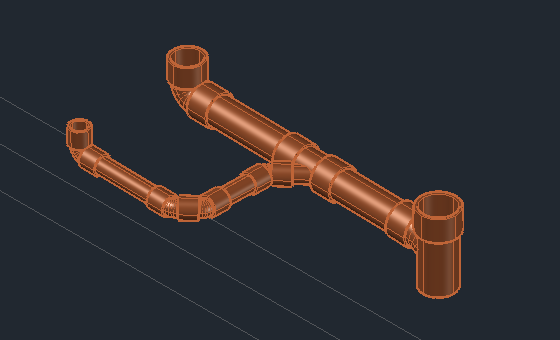
- Open the drawing Plumbing OG1. Page General routing: tile Stack down into the shaft 3.
- Tile Fixture (by default the lavatory) 2, then the toilet template (6 l / 7.5 l) of the push-fit system 1.
- Insert line from each fixture to the stack; Generate 3D.
More details
The stack gets the load of all fixtures above: toilet 2.0 + lavatory 0.5 = total DU 2.5. The stack pipe ends at the bottom of OG1 – that free end is where you connect on EG.
2. Draw the horizontal branch on EG
The horizontal branch on EG leads to the stack down in the kitchen.
- Open the drawing Plumbing EG. In the project palette load and show the reference OG1 – so you see the end on OG1.
- Stack down, a lavatory and the line from the shaft below OG1 to the stack; Generate 3D.
More details
The stack up belongs to the line and has its system. If the stack on OG1 has a different system than the palette, LuaCAD asks as it does at a connector (Rules for a drainage network): take over – line and stack up get the system of the stack, the palette switches; keep the palette – both stay in the system of the palette, the load from OG1 then does not count. The stack up carries no load of its own (total DU 0) – the command line says so: "The load from above from level OG1 does not count here: the stack there has the system WAS-… cast-in, the stack up here WAS-…". With take over or the same system the 2.5 from OG1 count again.
3. Connect on EG up to the end on OG1
An elbow by hand turns the pipe in the shaft upward, Connect places the pipe up to the end on OG1.
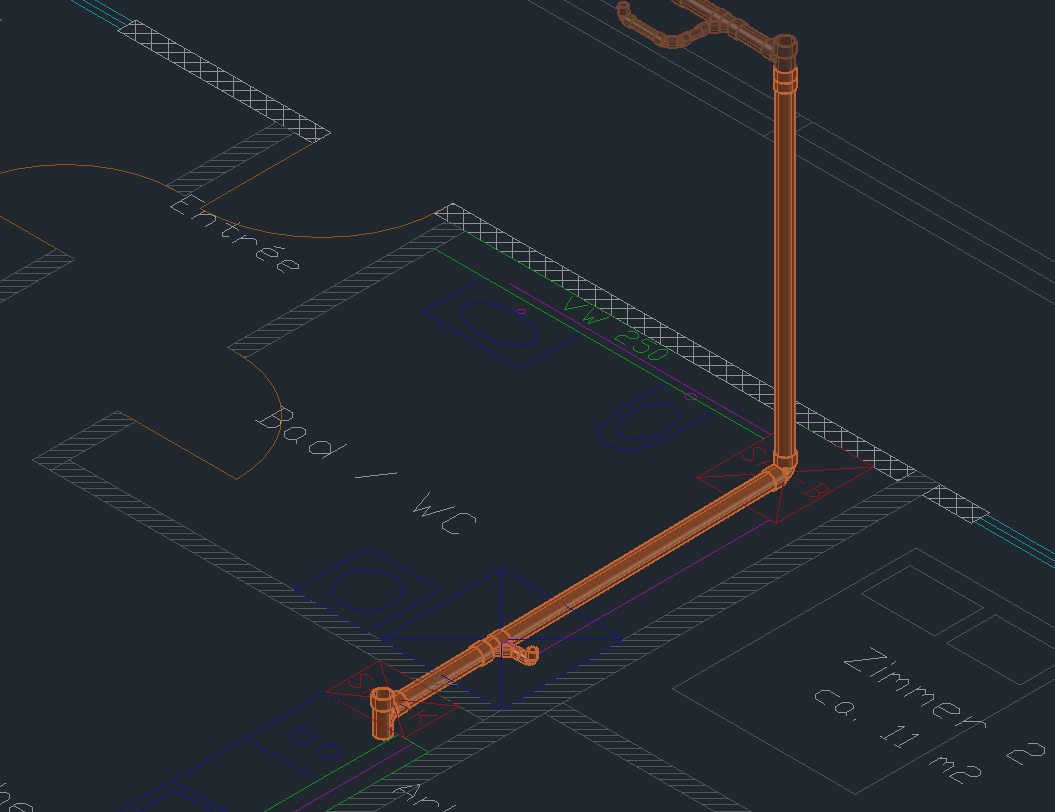
- Page Fittings: place an elbow by hand at the start of the line in the shaft – the corner on the axis of the stack, at the height of the horizontal branch, socket upward 3.
- Connect: click the upper end of the elbow, then the end on OG1 1. Accept the proposal "1 pipe DN 110 with push-fit coupling" (Enter) – the pipe reaches from the elbow up to just below the end on OG1 2.
More details
- The counterpart on EG is the stack up at the start of the line: Connect finds it on the axis of the stack and does not place a second one. Its main fitting becomes "fitting by hand" – the fittings in the shaft are now your elbow and the pipe, "Generate 3D" no longer places its own double 45° bend there (otherwise two parts would stand on top of each other in the shaft). The command line says so: "Its main fitting is now "fitting by hand" …". If the stack up is missing, Connect places a new one; it takes over the load from OG1.
- If the elbow is not at the height of the horizontal branch, the last pipe follows it with a different slope when you "Generate 3D" – a note in the result gives the difference ("The parts placed by hand in the shaft are 161 mm lower than the pipe …"). Then place the elbow higher or lower.
- Instead of Connect a pipe by hand also works: type Pipe, connect at the upper end of the elbow – the pipe reaches up to the end on OG1 by itself ("Pipe connected automatically up to … from level OG1"), its socket takes the spigot end there directly (Connecting two ends, Connecting across levels).
- The drawing of OG1 stays untouched.
4. "Generate 3D" on EG
"Generate 3D" keeps counting the load from OG1 – at the stack up that stands on the same axis as the connected pipe. The horizontal branch now starts at your elbow by hand; the double 45° bend from step 2 is gone.
- Generate 3D and click the stack on EG.
- In the result: the section from the shaft carries total DU 2.5 (from OG1), after the lavatory total DU 3.
5. Query the values
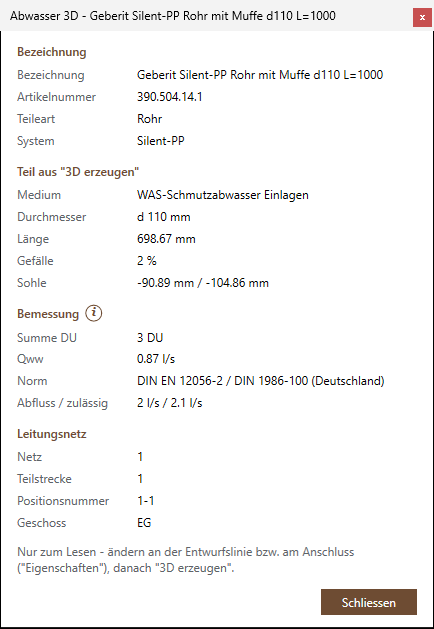
- Query and change properties (footer), click a pipe of the horizontal branch.
- The dialog box shows designation 1, diameter, length, slope and invert 2, total DU and Qww 3 and the network 4; Close 5.
More details
A part from "Generate 3D" shows its values read-only. Change the plumbing line or the connector, then "Generate 3D" again (Query and change properties).
What next?
More about levels: Connecting across levels and Dividing across levels.