
Clash detection
What clash detection is for
Goal: find, before construction, where parts of the model run into each other – a pipe inside a duct, a pipe through a wall without an opening, a duct too close to a beam.
The 3D parts of all LuaCAD plug-ins are checked against each other (Piping 3D, Ventilation 3D, Drainage 3D, blocks with solids from the Block Library), if you want also against the elements of an imported IFC architecture model and against every solid of the drawing. Parts in xrefs (other levels, other disciplines, the IFC) are included when you choose so.
- A clash is a location, not a pair of parts: when an insulated pipe crosses an insulated duct, it is listed once – not four times (pipe, insulation, duct, duct insulation).
- One list per drawing: the same list appears in every plug-in, no matter which one you check from. It is saved with the drawing.
- Decisions are kept: a clash you "accept" is still accepted after the next check; what has been fixed, the check sets to "resolved" by itself.
Where to start it
The Clashes section is in every plug-in with 3D parts – with the same content everywhere:
| Plug-in | Where | More |
|---|---|---|
| Piping 3D | Tools page, at the bottom | Checking for clashes |
| Ventilation 3D | Tools page, below the angle buttons | Checking for clashes |
| Drainage 3D | Tools page, at the bottom | Clashes |
| Block Library | Current Drawing page, below "Output and maintenance" | Clashes |
Without a palette: menu bar LuaCAD › Check clashes (the menu bar is only visible with MENUBAR 1). The result is then shown on the command line – see Without a palette.
The Openings plug-in has no section of its own: its 3D openings count as openings in the check of the other plug-ins (see IFC and clash check).
Checking for clashes
Goal: check the drawing with a check set and look at the clashes one by one.
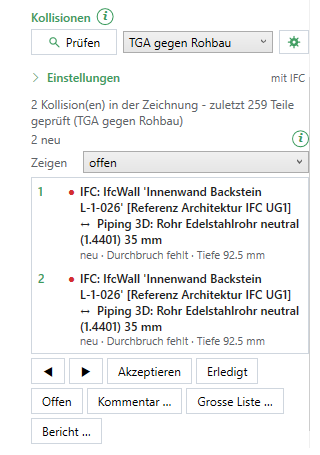
- Find the Clashes section in the palette (see Where to start it).
- Choose the check set – the list to the right of "Check". By default "MEP against structure".
- If needed, expand Settings and set the scope, xrefs and tolerances – see What is checked against what. The values belong to the check set and apply to all plug-ins.
- Check. After half a second a window shows the progress; Esc cancels, and nothing in the drawing changes.
- The command line sums up, for example "Clash detection: 812 parts, 37 pairs calculated, 2 new clash(es), 0 resolved." The list below shows two rows per clash: number, status dot, the two parts – below that status, type, depth, comments and notes.
- Click a row: the view goes to the location, the parts of this drawing are selected (the Properties palette shows them), parts in xrefs are highlighted. ◀ ▶ or the arrow keys in the list go to the previous or next clash.
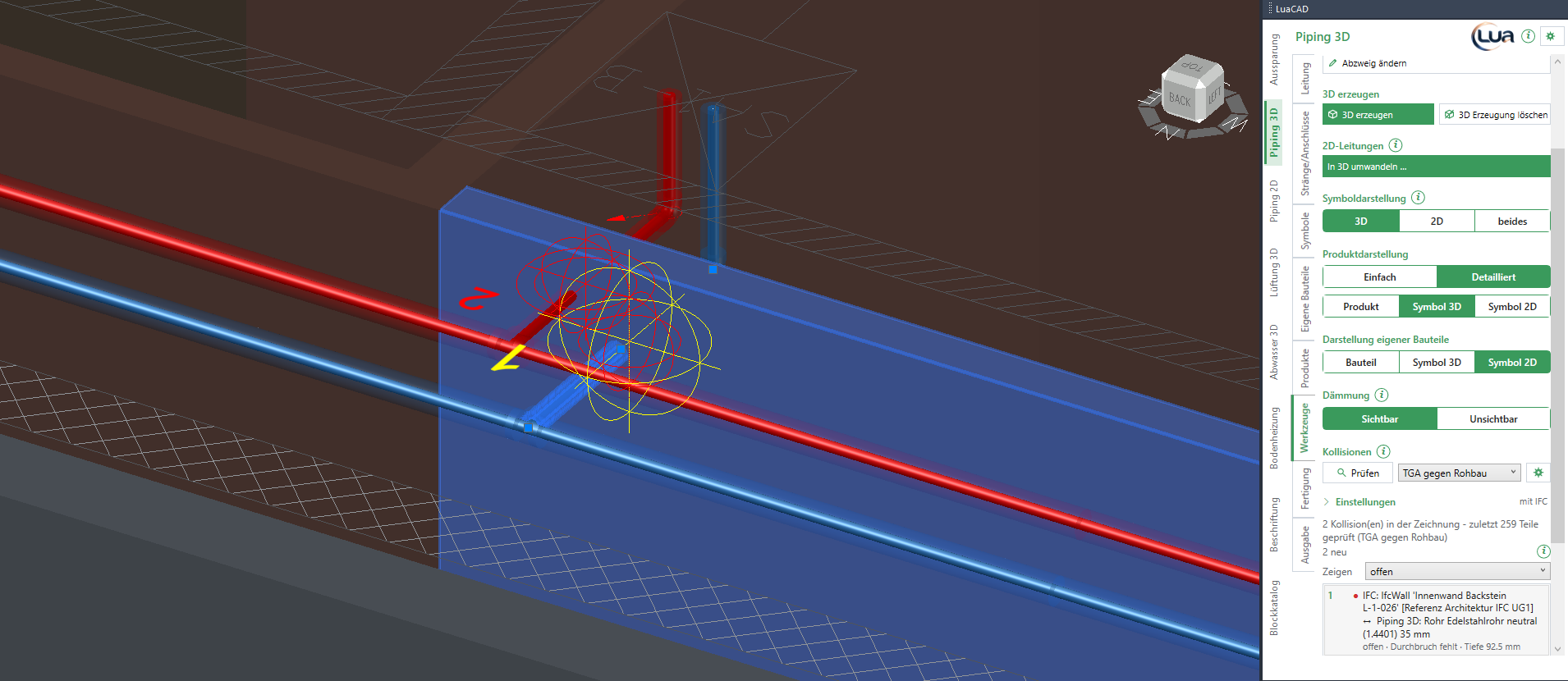
What is checked against what
What the check finds is set by the chosen check set. The settings are in the collapsed Settings area of the section; collapsed, it names the scope at the right ("with IFC").
Check set
A check set is a named scope with its own settings. There are two:
| Check set | Used for | Default |
|---|---|---|
| MEP against structure | The parts of the plug-ins also against walls, slabs and other elements of the IFC – with "opening missing". | selected; scope "with IFC elements" |
| MEP against each other | The parts of the plug-ins only – for coordinating the disciplines, without the many openings. | scope "LuaCAD parts only" |
At every check a set only updates the clashes it is able to find: an opening clash from "MEP against structure" stays when you check with "MEP against each other" afterwards. The Check set column of the large list tells which set found a clash.
Scope and xrefs
| Setting | Choice | Effect |
|---|---|---|
| Scope | LuaCAD parts only · with IFC elements · all solids | What is checked against. "with IFC elements" adds the elements of an IFC import, "all solids" also every other solid and every mesh – in model space, in other blocks and in xrefs. Surfaces, regions and 2D are never checked; IFC elements against each other and other solids against each other neither. |
| Xrefs | this drawing only · against its xrefs · also xref against xref | How far attached drawings are included. "against its xrefs" only checks pairs that involve a part of this drawing. "also xref against xref" adds pairs where both parts lie in xrefs – needed by whoever coordinates the disciplines. |
With "this drawing only" and loaded xrefs the list says "2 xref(s) loaded - only this drawing was checked." Parts on layers that are off or frozen always stay out – also when you turn off the layer of an xref in the host drawing.
IFC groups and openings
IFC groups: one check box per group – wall, slab, column, beam, stair, ramp, roof, door, window, furniture, other. By default all except furniture. Spaces and openings of the IFC are never checked. The check boxes can only be changed with the scope "with IFC elements" or "all solids".
Report openings (on by default): when a pipe or duct of Piping 3D, Drainage 3D or Ventilation 3D runs through a wall, slab or roof of the IFC, the check reports instead of "hard":
| Type | Meaning |
|---|---|
| Opening missing | There is no 3D opening at this location – the depth is the length of the pipe inside the element. |
| Opening too small | An opening is there, but the part sticks out with its insulation – the depth is the overhang. |
If the pipe with its insulation fits into the opening, it is no clash. Without the check box the same location is a hard clash.
Insulation and tolerances
| Setting | Effect | Default | Example |
|---|---|---|---|
| Check insulation | If only an insulation touches another part, the clash is listed with the type "insulation". Without the check box only pipe, duct and solid count. | checked | unchecked: a pipe whose insulation brushes the duct is not reported |
| Minimum clearance | Parts that do not touch but are closer than this distance are reported as "too close" with the distance. 0 = off. | 0 | 50 mm: a pipe 30 mm below a duct appears as "too close · distance 30 mm" |
| Penetration depth | Less deep inside each other is no clash – facets of IFC meshes, joints. | 2 mm | 5 mm, if an IFC made of coarse meshes gives many false hits |
| Grouping | Hits between the same two objects that lie closer than the larger cross section plus this value are one clash. | 100 mm | a pipe runs 5 m inside a duct: one row instead of many |
Check changes only
Check changes only (checked by default): the check only calculates pairs with a part that is new or has changed since the last check of this set; the other clashes stay as they are. The list then says "last 3 of 812 parts checked". If the set, the drawing units or an opening change, everything is checked by itself. To force a full check once: gear of the section › Check everything again.
What is never a clash
| Case | Why |
|---|---|
| Connected parts – pipe on an elbow, flange on a valve, pipe on the connector of a fixture | Their connectors meet (within 1 mm), or the plug-in reports them as connected – also across plug-ins and risers. |
| Two parts of the same pipe run that are connected by one third part (the pipes on an elbow or tee) | Their insulations touch by design. |
| Accessories that enclose a pipe (hanger, sleeve, flange bolts, a takeoff on its duct) | They sit on the pipe on purpose. |
| A pipe inside a 3D opening | The opening is a void – it only counts for "opening missing / too small". Two openings that overlap are reported. |
| IFC against IFC, other solid against other solid | Nobody changes that in this drawing. |
| A riser divided across levels | Its pieces in the drawings of the levels are one object – an obstacle at the joint is one clash, not two. |
Working on clashes
Goal: decide every clash – accept, resolve or comment – so that the list shows the state of coordination.
- Select a row.
- Accept (intended), Resolved (fixed) or Open (to be solved again) – every click is one undo step.
- Comment … opens the clash comment: status and a text, saved with name and time.
- Show chooses which clashes the list shows: open · open + accepted · accepted · resolved · all (by default "open" – the new ones count as open).
| Status | Dot | Meaning |
|---|---|---|
| new | red, row in bold | found for the first time at the last check; open after the first click |
| open | red | still to be solved |
| accepted | green | intended – stays accepted at every check; if it gets half as deep again, "has got worse" is added |
| resolved | gray | fixed; "resolved (no longer found)" is set by the check itself. If a resolved clash occurs again, it becomes open with "occurred again" |
Part selected: when you select a part in the drawing, the list only shows its clashes ("2 clash(es) on the selected parts") until the selection is empty.
Shortcut menu of a row (right-click the row):
| Entry | Effect |
|---|---|
| Show | like a click on the row |
| Accept, Resolved, Reopen, Comment … | like the buttons |
| Select part A, Select part B | selects the parts of one side – then for example "Change elevation" in the plug-in. If the part lies in an xref, it is only highlighted. |
| Show only this one | hides everything else; Enter or Esc shows everything again |
| Save view | saves the current view with the clash; a click on the row then shows the location exactly like this |
Clash comment
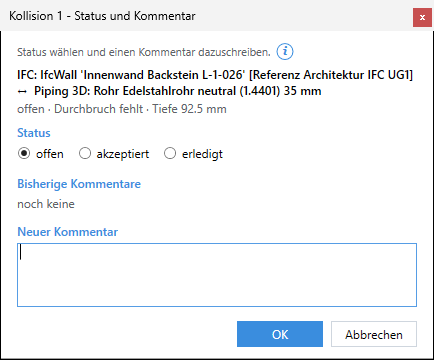
| Field | Effect | Default | Example |
|---|---|---|---|
| Status | open · accepted · resolved; with several clashes selected also "Do not change status". | one clash: its status; several: Do not change status | resolved after rerouting |
| Previous comments | All earlier comments, one row each "name, time: text" (display only). | none yet | "MK, 11/9/2026 2:05 PM: duct 100 mm higher" |
| New comment | Text about the clash; it is kept at every check. The name is the author – without an author "LuaCAD" is written. | empty | "Route the pipe below the duct" |
| OK, Cancel | OK sets status and comment in one step (U undoes it). | – | – |
Large list and report
Goal: see all clashes with all columns in a coordination meeting, sort and group them, and pass them on as an Excel file.
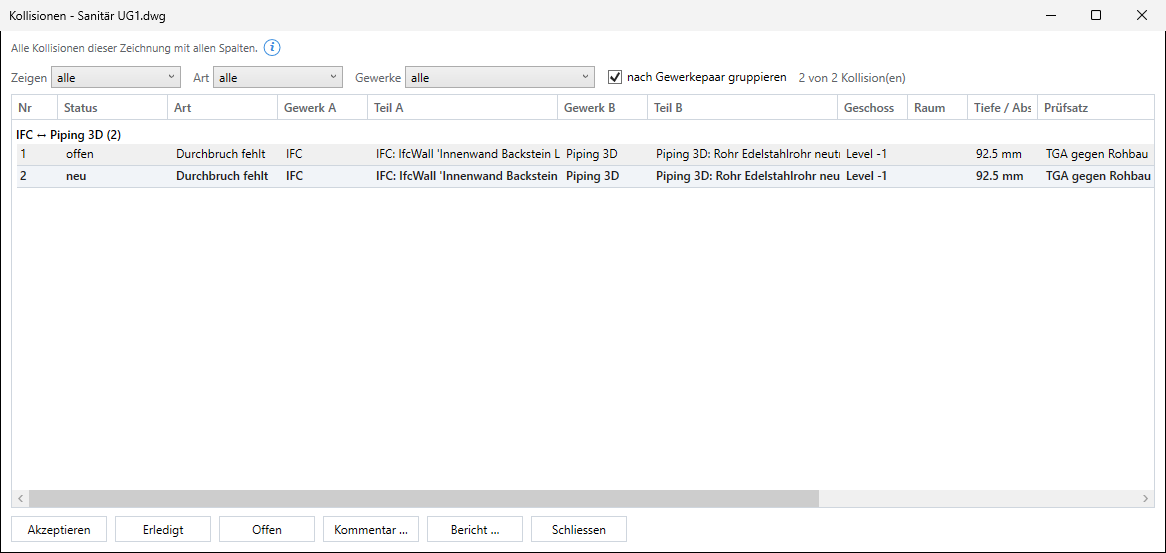
- In the section Large list … – a window of its own that you can move freely; the drawing stays usable.
- Filter at the top: Show (status, by default "all"), Type, Disciplines (discipline pair). Group by discipline pair combines the clashes of two disciplines, for example "IFC ↔ Piping 3D (12)".
- A click on a column header sorts. A click on one row shows the location as in the section.
- Select several rows with Ctrl or Shift and Accept, Resolved, Open or Comment … them together. The shortcut menu of a row is the same as in the section.
- Report … writes exactly the rows the table shows – in their order – into an Excel file. A file name is suggested (
<drawing>_Kollisionen.xlsx), then the file opens.
| Column | Content |
|---|---|
| No. | running number – it stays, even when others are resolved |
| Status, type | as in the section; type "hard", "insulation", "too close", "opening missing", "opening too small", with "(uncertain)" if only the outlines could be compared |
| Discipline A, part A, discipline B, part B | plug-in or IFC or solid, the name, for xrefs "[xref <file>]" |
| Level, room | the project level of the drawing of the part – also for an IFC element: a wall from the reference "Architektur IFC UG1" is listed under UG1, not under the level name of the IFC ("Level -1"); without a project the name from the IFC. The room is not determined yet |
| Depth / distance | penetration depth, for "too close" the distance |
| Check set, last found | with which set, when last |
| Comment, note | the last comment; "has got worse", "occurred again" |
The report has the same columns plus "first found" and all comments; title "Clash report - <drawing> - <check set> (<xrefs>) - <date>". Report … in the section takes the rows the section shows (filter "Show", and only those of the selected part, if any).
Markers in the drawing
Goal: see the clashes in the drawing – temporarily while working, persistent for a plan or a PDF.
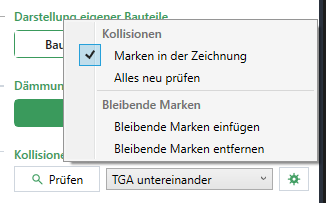
Temporary markers (gear › Markers in the drawing, on by default): at every clash of the list a sphere with its number – red open (new with a ring), green accepted, gray resolved, the selected one yellow and bigger. They are only there while a Clashes section is visible, are not written into the drawing and not plotted. Shown are the clashes the list shows – at most 300, plus always the selected one.
Persistent markers:
- Use Show in the list to choose what goes onto the plan.
- Gear › Insert persistent markers: per clash of the list a circle and the number in the color of the status, on the layer
LuaCAD_ALG_Kollisionen(not plotted by default – turn plotting on for the layer). Existing persistent markers are replaced. - Gear › Remove persistent markers takes all of them out again.
Each is one undo step. The size follows the location: at least 150 mm, at most 1.5 m.
Without a palette: the result on the command line
If no Clashes section is visible (palette closed, another page open, check from the menu bar or the command of a plug-in), every clash is a line on the command line, for example "Clash 1: Piping 3D: pipe … with Ventilation 3D: duct … [xref Ventilation EG] at 4200 / 1850 / 2600 - hard, depth 120 mm". The parts of this drawing are highlighted, the view shows all of them; Next goes from location to location, All shows all again, Enter ends. The clashes still go into the list of the drawing – when you open the section afterwards, they are there.
Check while drawing
When you place a segment, Piping 2D and Piping 3D check right away against their own pipes – independent of clash detection:
- Piping 2D: the segment crosses a pipe on the same system elevation – see Inserting a pipe.
- Piping 3D: the pipes (with insulation) would come too close – see Prompts.
The question offers "Choose another system elevation" or "Choose another elevation", "Ignore and continue" or Cancel. It writes nothing into the list and knows no ducts, IFC elements or xrefs – that is what clash detection is for.